How To Disable Control Lock On Your GE Oven Right Now
Struggling with a locked GE oven control panel? You can disable the control lock in just a few simple steps. Whether your GE oven has a touchpad lock, a button combo, or a hidden settings menu, this guide walks you through the exact process. We also cover common problems, model-specific instructions, and expert tips to keep your oven working smoothly.
Have you ever walked into your kitchen, ready to cook dinner, only to find that your GE oven control panel is completely locked? You press buttons, nothing happens. You wonder if the oven broke. The screen might even show a little lock icon staring back at you. It is frustrating, but here is the good news. Disabling the control lock on a GE oven is usually very simple. You do not need to be a repair expert or call a technician. Most of the time, a few button presses will free up your oven right away.
This guide will walk you through every method to disable the control lock on your GE oven. We cover the most popular GE oven models, common reasons the lock activates, and step-by-step instructions you can follow right now. Whether you own a GE Profile oven, a GE Cafe model, or a basic GE electric range, you will find the solution here. Let us get your oven unlocked and ready to cook.
Key Takeaways
- Fast Fix: Most GE ovens let you disable the control lock in under 30 seconds using a simple button combination.
- Model Matters: Different GE oven models use different lock methods, so we cover the most popular ones.
- Reset Works: A quick oven reset often clears a stubborn control lock without any tools.
- Prevent Future Issues: Simple habits can stop the lock from activating by accident again.
- Know When to Call a Pro: Some lock problems need a technician, and we explain when that is the right call.
📑 Table of Contents
- What Is the Control Lock Feature on a GE Oven?
- How To Disable Control Lock On GE Oven
- GE Oven Models and Their Lock Systems
- Common Problems When the Control Lock Won’t Release
- Preventing Future Lock Issues on Your GE Oven
- When To Call a Professional for GE Oven Lock Issues
- Expert Tips for GE Oven Owners
- Key Takeaways
- Conclusion
What Is the Control Lock Feature on a GE Oven?
The control lock is a safety feature built into GE ovens. It locks the control panel so that no buttons respond. This feature is also called the oven lock or the control panel lock. Its main purpose is to prevent accidental button presses. This is especially helpful in homes with young children. When the lock is on, the oven will not start or stop from random presses. The lock icon or a small padlock symbol usually appears on the display.
GE ovens use different types of lock systems. Some models have a physical lock on the oven door. Others lock the touchpad or button panel on the front. The GE oven control lock you are dealing with depends on your specific model. Understanding which type you have is the first step to fixing it.
Why Does the Control Lock Activate?
The control lock can turn on for several reasons. The most common cause is pressing the wrong button combination. Many GE ovens have a specific key sequence that activates the lock. Kids might also press buttons and accidentally turn it on. A power surge or an oven reset can sometimes trigger the lock too. In rare cases, a software glitch in the GE oven control board causes the lock to stick. Knowing why it happened can help you prevent it in the future.
Here are the most common reasons the lock activates:
- Accidental button press: You or someone else hit the lock button by mistake.
- Child safety feature: The lock turns on automatically if a child presses multiple buttons.
- Power outage: A sudden power loss can reset the oven into lock mode.
- Firmware update: Some newer GE ovens lock the panel after a software update.
- Error code: Certain GE oven error codes trigger the lock as a safety measure.
How To Disable Control Lock On GE Oven
Now let us get to the main part. Disabling the control lock on your GE oven is straightforward for most models. The exact steps depend on whether your oven has a touchpad, a dial, or a digital display. Below, we break it down by the most common GE oven types.
Method 1: The Button Combination Trick
This is the most common way to unlock a GE oven. It works on many models including the GE JB645RKSS, GE PTD900SNSS, and similar units. Follow these steps carefully:
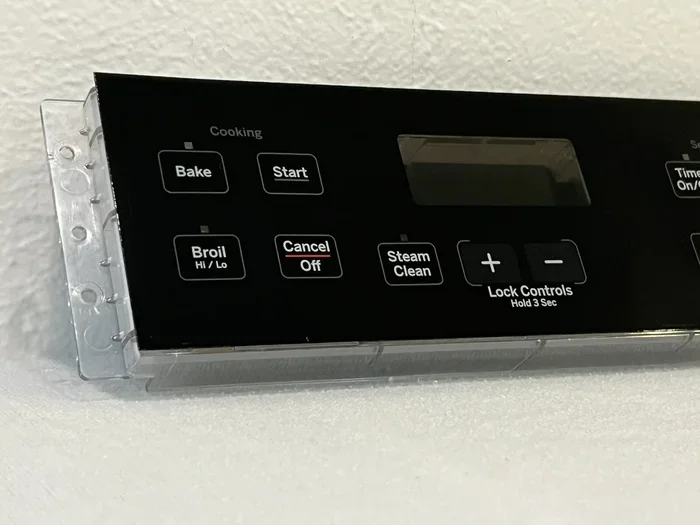
- Locate the Lock button. It is usually on the top row of the control panel. It may have a padlock symbol on it.
- Press and hold the Lock button for three to five seconds. Watch the display carefully.
- Release the button when the lock icon disappears. The panel should beep or flash to confirm.
- Test the oven. Press any button like Start or Bake to make sure it responds.
If this does not work, do not worry. There are more methods to try. Some GE models use a different button combination. For example, on certain GE Cafe ovens, you hold the Bake and Broil buttons together for five seconds. On older GE models with mechanical dials, the lock might be a switch on the back of the panel. Always check your user manual for model-specific instructions.
Method 2: The Reset Method
A reset can clear many oven issues, including a stuck control lock. This method works when the lock will not release with the button combo. Here is what to do:
- Turn off the oven. Press the Off/Clear button or switch the dial to off.
- Unplug the oven from the wall outlet. Wait for at least 60 seconds.
- Plug the oven back in. Wait for the display to power up fully.
- Try unlocking again. Use the Lock button method from Method 1.
This reset clears the oven’s temporary memory. It often fixes a GE oven control lock that is stuck due to a minor glitch. Think of it like restarting your phone when it freezes. The reset gives the oven a fresh start.
Method 3: Using the GE Oven Settings Menu
Newer GE ovens with smart features have a settings menu where you can toggle the lock on and off. This method works on Wi-Fi-enabled GE Profile and GE Cafe models. Here is how to access it:
- Step 1: Press the Menu or Settings button on the control panel.
- Step 2: Scroll through the options using the arrow keys.
- Step 3: Look for Control Lock, Lock, or Preferences.
- Step 4: Select it and choose Off or Disable.
- Step 5: Press Start or Confirm to save the change.
If you cannot find the lock option in the menu, try searching for “Control Lock” in the settings. Some GE ovens organize this under Safety Settings or Parental Controls. The exact path varies by model, but the menu approach works on most smart GE ovens released after 2018.
GE Oven Models and Their Lock Systems
GE makes many different oven models, and each one may handle the control lock a bit differently. Below is a quick look at how some popular GE oven lines handle the lock feature.
| GE Oven Model Series | Lock Type | How To Unlock |
|---|---|---|
| GE Profile (Smart Models) | Touchpad lock with settings menu | Settings menu or Lock button hold |
| GE Cafe Series | Touchpad lock | Bake + Broil button hold |
| GE Electric Range (Basic) | Button lock | Lock button hold for 3-5 seconds |
| GE Slide-In Ranges | Control lock | Lock button or reset method |
| GE Wall Ovens | Display lock | Settings menu or manual release |
Always refer to your specific model number when looking for instructions. You can find the model number on a sticker inside the oven door frame or on the back panel. If you have trouble finding it, search for “GE oven model number location” and you will find helpful guides.
Common Problems When the Control Lock Won’t Release
Sometimes the lock just will not go away no matter what you try. This can be very frustrating. Here are the most common reasons the GE oven control lock stays stuck, and what you can do about each one.
The Lock Icon Flashes but Does Not Go Away
This usually means the oven’s control board is not receiving the unlock command correctly. Try the reset method first. Unplug the oven for two full minutes instead of 60 seconds. This gives the control board more time to fully reset. Plug it back in and try the Lock button again. If the flashing continues, there may be a deeper issue with the GE oven control board that needs professional attention.
No Buttons Respond at All
If the entire control panel is unresponsive, the lock might not be the only problem. A power issue could be causing both the unresponsiveness and the lock. Check the following:
- Check the circuit breaker. Your oven might have tripped a breaker in your home’s electrical panel.
- Inspect the power cord. Make sure it is firmly plugged in and not damaged.
- Test the outlet. Plug another appliance into the same outlet to see if it works.
If the outlet works but the oven still does not respond, you may need to contact GE oven repair support or a qualified technician.
The Lock Activates Again After You Unlock It
This is a sign of a recurring software or hardware issue. The oven’s control board might have a fault that keeps reactivating the lock. Here are some steps to try:
- Perform a full factory reset. Check your user manual for the reset procedure specific to your model.
- Update the firmware. If your GE oven is a smart model, check the GE Appliance app for any available updates.
- Clean the control panel. Dirt and grease buildup around the buttons can cause false inputs that trigger the lock.
If none of these steps work, the control board itself may need replacement. This is a job for a professional appliance repair technician.
Preventing Future Lock Issues on Your GE Oven
Once you have successfully disabled the control lock, you probably want to avoid dealing with it again. The good news is that a few simple habits can prevent most lock issues. These tips will help keep your GE oven running smoothly and your control panel responsive.
- Teach everyone in the house about the lock button. Knowing what it does prevents accidental presses.
- Keep the control panel clean. Wipe it down regularly with a soft damp cloth. Grease and food splatter can cause buttons to stick.
- Avoid pressing multiple buttons at once. This is the number one cause of accidental lock activation.
- Use surge protectors. Power surges can cause the oven to lock up. A surge protector adds a layer of protection.
- Update your oven firmware. If your GE oven connects to Wi-Fi, check for updates through the GE Appliance app every few months.
- Read your user manual. It sounds boring, but the manual has specific lock instructions for your exact model. It can save you a lot of time.
Taking these small steps goes a long way. You will spend less time troubleshooting and more time cooking your favorite meals. A well-maintained oven also runs more efficiently, which can save on energy costs over time.
When To Call a Professional for GE Oven Lock Issues
Most control lock issues can be fixed at home with the methods in this guide. However, there are times when calling a professional is the right choice. You should consider getting help if:
- The oven still does not respond after a full reset. This could indicate a problem with the control board or wiring.
- You smell burning or see sparks. Turn off the oven immediately and call for help. Do not try to fix electrical issues yourself.
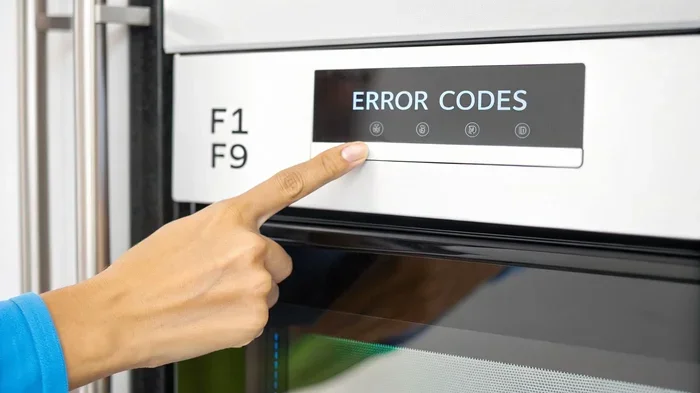
- The lock comes with error codes. Error codes like F1, F2, or F3 on your GE oven display often point to specific hardware failures.
- The oven is under warranty. DIY repairs can void your warranty. Contact GE support first to avoid losing coverage.
- You are not comfortable working with electrical appliances. There is no shame in calling a pro. Safety always comes first.
GE offers customer support through their website and phone line. You can also schedule a service visit with a certified GE technician. They have the tools and training to diagnose and fix complex oven problems quickly and safely.
Expert Tips for GE Oven Owners
Here are some extra tips from experienced oven users and appliance experts. These small insights can make a big difference in how you use and maintain your GE oven.
Tip 1: Learn your model’s quick-access lock shortcut. Every GE oven model has a specific way to toggle the lock. Once you learn it, you will never get stuck again. Write it down and tape it inside your kitchen cabinet near the oven.
Tip 2: Keep a digital copy of your user manual. If you lose the paper manual, you can usually find a PDF version on the GE Appliances website. Search by your model number and download it to your phone. This way, you always have instructions at your fingertips.
Tip 3: Use the lock feature intentionally. The control lock is not just a nuisance. It is a useful safety tool. Use it when you have curious toddlers in the kitchen. It prevents them from accidentally turning on the oven or changing the temperature. Think of it as a child safety lock for your appliance.
Tip 4: Replace batteries in smart models regularly. If your GE oven has a backup battery for memory retention, weak batteries can cause control panel glitches including unexpected lock activation. Check the batteries once or twice a year.
Tip 5: Do not ignore error codes. When your oven displays an error code along with the lock, address it right away. Ignoring it can lead to bigger problems down the road. A quick search of the error code online or in your manual can often point you to the fix.
Key Takeaways
- Quick Unlock: Most GE ovens unlock with a simple three to five second hold of the Lock button.
- Reset Fixes Most Issues: Unplugging the oven for 60 seconds or more clears many lock problems.
- Model Matters: Different GE oven lines use different lock systems. Always check your specific model.
- Smart Ovens Have a Menu Option: Wi-Fi-enabled GE ovens let you toggle the lock through the settings menu.
- Prevention Is Easy: Keeping the panel clean and avoiding accidental button presses stops most lock issues.
- Call a Pro When Needed: Persistent lock problems or error codes may need a professional technician.
Conclusion
Disabling the control lock on your GE oven does not have to be stressful. With the right steps, you can unlock your oven in under a minute. Whether you use the Lock button hold, the reset method, or the settings menu, you now have multiple ways to solve this problem. The key is to stay calm and work through the methods one at a time.
Remember that the control lock is a safety feature designed to protect you and your family. Once you know how to turn it on and off, it becomes a helpful tool rather than a frustrating obstacle. Keep this guide bookmarked for future reference. Share it with other GE oven owners in your household so everyone knows how to handle the lock.
Your oven is one of the most important appliances in your kitchen. Taking a few minutes to understand its features, including the control lock, pays off every time you cook. Now go ahead, unlock that GE oven, and get dinner started. You have got this.
Frequently Asked Questions
How do I unlock my GE oven control panel?
Press and hold the Lock button on your GE oven control panel for three to five seconds. The lock icon should disappear from the display. If it does not work, try unplugging the oven for 60 seconds and then plugging it back in. After the reset, try the Lock button method again.
Why is my GE oven locked and will not unlock?
A GE oven may stay locked if there is a software glitch, a power surge, or a problem with the control board. Try a full reset by unplugging the oven for two minutes. If the lock still will not release, check for error codes on the display. Persistent lock issues may require professional repair.
Where is the control lock button on a GE oven?
The Lock button is usually located on the top row of the GE oven control panel. It often has a padlock symbol next to it. On some GE Cafe models, the lock function is activated by holding the Bake and Broil buttons together for five seconds. Check your specific model’s user manual for the exact location.
Can I disable the control lock on a GE oven without the manual?
Yes, you can. Most GE ovens use the same Lock button hold method. You can also find your model’s manual as a free PDF on the GE Appliances website. Search for your model number and look in the troubleshooting section for lock instructions.
Is the control lock the same as the oven door lock?
No, they are different. The control lock locks the buttons and touchpad on the front of the oven. The oven door lock locks the oven door itself, usually during the self-clean cycle. If your oven door is locked, you need to wait for the self-clean cycle to finish or follow the door release procedure in your manual.
How do I prevent the control lock from activating by accident?
Keep the control panel clean and free of grease buildup. Teach everyone in the household to avoid pressing multiple buttons at once. If you have young children, consider keeping the lock enabled as a safety feature. You can also use a surge protector to prevent power-related lock activations.